
Start with one small thing
One form, spreadsheet, report, workflow, reminder, intake step, or repeated admin task is enough for a useful first review.
What we can fix
We help business owners clean up forms, spreadsheets, reports, reminders, follow-up, intake, Google Workspace, Microsoft 365, dashboards, custom workflow apps, and practical AI support without turning the project into a complicated software rebuild.
Start with one form, one spreadsheet, one report, one workflow, or one repeated admin task. The next step is a Free Automation Review.

Built around your daily work
Forms, inboxes, sheets, dashboards, follow-up, and owner reports can be made clearer before anything gets automated.
From article to action
The services page is the practical next step after the automation-first guide. Bring one messy workflow, repeated admin task, form, spreadsheet, report, or follow-up problem, and we will help identify the first useful fix.
One form, spreadsheet, report, workflow, reminder, intake step, or repeated admin task is enough for a useful first review.
Google Workspace, Microsoft 365, Apps Script, Power Automate, dashboards, and existing spreadsheets can often carry the first fix.
Larger projects can become custom internal systems, portals, dashboards, or workflow apps when a simple fix is no longer enough.
Choose the next step
Use this page as the routing point for service fit, first automation targets, practical examples, proof patterns, and the Free Automation Review.
Match the bottleneck to the right starting point before choosing a tool, app, or automation path.
Use the first-step guide when the problem is a repeated admin task, form, spreadsheet, report, reminder, or intake handoff.
Compare practical automation examples with public-safe proof patterns before deciding how far the workflow needs to go.
Bring one messy process, file, report, form, or follow-up problem and use the Free Automation Review as the handoff.
For businesses that have a process that works only because someone keeps chasing every step manually. We review intake, follow-up, reminders, approvals, reporting, and owner visibility so the next step is easier to see.
Get a Free Automation ReviewStart with one workflow, form, sheet, report, or repeated office task.
Map the current workflow
Find repeated steps and handoffs
Identify where work depends on memory
Clarify what happens next
Show what needs owner review
Document the cleaner workflow
Prepare the process for future automation
For businesses using forms, spreadsheets, dashboards, and reports that have grown messy over time. We help organize the information, reduce duplicate entry, and make the next action easier to review.
Get a Free Automation ReviewStart with one workflow, form, sheet, report, or repeated office task.
Review current forms and fields
Clean up spreadsheet structure
Reduce duplicate data entry
Improve reporting views
Clarify dashboard inputs
Make information easier to review
Prepare the data path for automation
For repetitive admin work that should not need to be done by hand every time. We look for safe places to automate reminders, intake steps, task routing, follow-up, and reporting in Google Workspace, Microsoft 365, or the tools you already use.
Get a Free Automation ReviewStart with one workflow, form, sheet, report, or repeated office task.
Follow-up reminders
Form-to-sheet workflows
Apps Script automations
Power Automate flows
Task routing
Team alerts
Daily or weekly reports
File and status organization
Office handoff cleanup
Owner review queues
For work that has outgrown forms, spreadsheets, and small automations. We can plan or build a focused internal system around one business process without starting with a large platform rollout.
Get a Free Automation ReviewStart with one workflow, form, sheet, report, or repeated office task.
Internal admin tools
Simple dashboards
Client or staff portals
Focused databases
Role-based work queues
Custom intake tools
Field or office workflows
Owner visibility tools
For businesses that want practical AI help without turning the company into an AI experiment. We use AI to support workflow, summaries, routing, visibility, and admin cleanup while keeping human review in the process.
Get a Free Automation ReviewStart with one workflow, form, sheet, report, or repeated office task.
Internal draft summaries
Intake note review
Routing and classification support
Owner visibility summaries
Staff support prompts
First-draft follow-up language
Internal search planning
Human approval checkpoints
AI output limits
Fallback process planning
If you already know the problem area, start with the page that matches the workflow or tool ecosystem you want to clean up first.
Practical Google Workspace automation for cleaner Sheets, Forms, Gmail follow-up, Calendar reminders, Drive organization, Apps Script, and owner visibility.
View service pagePractical Microsoft 365 automation for Excel cleanup, Forms intake, Outlook follow-up, Teams alerts, SharePoint, Power Automate, and owner visibility.
View service pageClient intake automation for forms, calls, emails, texts, chat, confirmations, owner alerts, tasks, handoffs, status tracking, and owner visibility.
View service pageFollow-up automation for missed-call callbacks, email and SMS follow-up, client reminders, document requests, payment reminders, owner alerts, and status visibility.
View service pageWorkflow automation for small businesses that need cleaner intake, follow-up, reporting, approvals, dashboards, and handoffs.
View service pageIf the question is whether to use Google, Microsoft, a CRM, a custom app, or a spreadsheet repair first, these pages give the practical answer.
AI automation services
Practical AI automation services for small businesses: cleaner intake, follow-up, routing, draft support, reports, and human-reviewed workflows.
Read guideAI answering service
Practical AI answering service workflow support for missed-call capture, voicemail summaries, callback tasks, intake notes, owner alerts, and human-reviewed follow-up.
Read guidePlatform comparison
Compare Google Workspace automation and Microsoft 365 automation for small business workflows, forms, spreadsheets, email, reminders, approvals, and dashboards.
Read guideDecision guide
A practical guide for deciding whether a small business needs simple automation, CRM cleanup, workflow cleanup, or a custom business app.
Read guideTool strategy
Practical AI tools for small business operations, including intake cleanup, summaries, draft follow-up, reporting, reminders, routing, and human-reviewed workflows.
Read guideSpreadsheet decision guide
A practical guide for deciding whether a business spreadsheet needs repair, cleanup, automation, a dashboard, a workflow system, or a custom app.
Read guideWorkflow platform
A practical workflow automation platform approach for small businesses that need automation and AI across intake, follow-up, reporting, approvals, dashboards, and handoffs.
Read guideLocal and remote service
Miami based AI automation services for small businesses, with remote support across the United States.
Read guideMiami business automation
Miami business automation services for small businesses that need cleaner intake, follow-up, spreadsheets, dashboards, and workflow systems.
Read guideMiami AI consultant
Small business AI consultant in Miami for practical automation, AI support, workflow cleanup, spreadsheet repair, and custom app planning.
Read guideA first fix may start in a form, sheet, or report. If the business has outgrown that, the same process can grow into a portal, dashboard, internal tool, or controlled automation.
Guided intake flows with controlled AI support
Phone menus and voice workflows
Shared business phone apps
SMS automations with approved messaging rules
Voicemail, transcripts, and missed-call follow-up
Owner dashboards
Client and staff portals
Role-based access
Case, job, and project tracking
Review queues and approval workflows
Multi-step intake forms
Draft recovery on mobile interruptions
Stripe and payment-mode readiness
PDF, email, SMS, and calendar handoffs
Google Workspace and Microsoft 365 automations
Firebase, Firestore, RTDB, and Supabase backends
Privacy controls and safe public lookup
Reporting dashboards and CSV exports
Compliance holds and exception review
API routes, webhooks, and integration boundaries
This is written plainly so owners can match the problem they feel today to the first useful service bucket. The main next step is still the Free Automation Review, not a new form or a software purchase.
the user has a specific broken formula, spreadsheet, Apps Script, Power Automate flow, form, email reminder, or report calculation issue.
the user repeats a task manually, such as sending follow-up emails, moving form data, creating reminders, organizing files, or generating weekly reports.
the user has a process problem across people, tools, approvals, status updates, invoices, job tracking, or owner reporting.
the user has outgrown spreadsheets and needs role-based software, a database, a portal, a field-team app, an admin dashboard, or an AI-powered assistant.
Start with a Free Automation Review of one workflow, form, spreadsheet, report, or repeated admin task. The first useful fix may be small, and larger systems should come only when the workflow needs them.
Yes. AI Business Services works with Google Sheets, Google Forms, Apps Script, Gmail, Calendar, Excel, Microsoft Forms, Power Automate, SharePoint, and Power BI.
Yes. The service is designed for owner-operators and small teams that need practical tech help without a large internal IT department.
Yes. AI Business Services can start with one workflow, clean it up, automate the first version, and grow it into a workflow automation platform using automation and AI only where they reduce real manual work.
No. AI is used for controlled support such as summaries, routing, intake review, draft preparation, and visibility. Sensitive messages, approvals, pricing, payments, and important business decisions should keep human review.
Yes. Many projects start by repairing the existing spreadsheet, formulas, validation rules, or report structure before recommending automation or a custom app.
Yes. Gmail, Google Sheets, Google Forms, Calendar, Drive, and Apps Script can often be connected for intake, confirmations, reminders, owner alerts, and reporting.
Yes. Excel, Outlook, Microsoft Forms, Teams, SharePoint, Power Automate, and Power BI can support reminders, approvals, file routing, reporting, and workflow handoffs.
Start by fixing what already exists when possible. A custom app only makes sense when spreadsheets, forms, CRMs, and small automations can no longer support the workflow cleanly.
Simple quick fixes can start around $99, small automations can start around $299, workflow systems can start around $1,000, and custom apps depend on scope.
Most small businesses do not need to throw away the tools they already use. We help Google and Microsoft systems work better together.
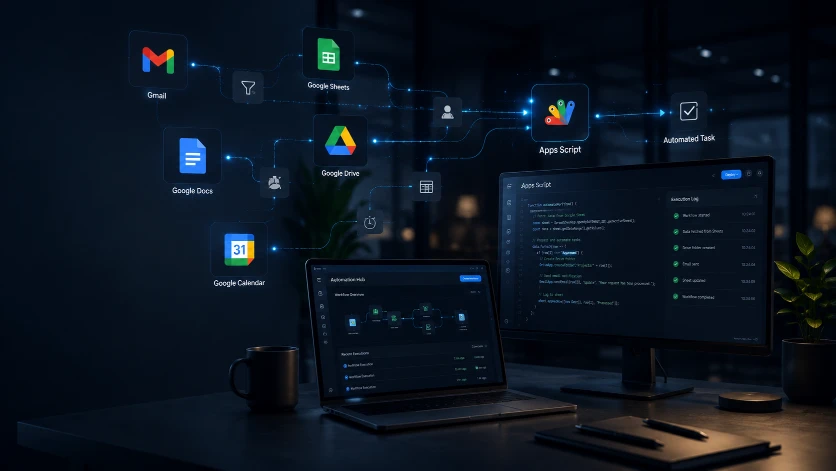
Google Sheets
Forms
Apps Script
Gmail and Calendar automation
Looker Studio dashboards

Excel formulas
Microsoft Forms
Power Automate
SharePoint
Power BI dashboards